Getting Started
What You Need
One executable, lp9, and the directory of the standard library. The interpreter, the builder, the language server and the debugger are all that one executable.
lp9 run needs nothing else. On Windows the SDL3 DLL comes with lp9.
lp9 build needs the Zig toolchain. It turns an LP-9 program into Zig source and has Zig make a native executable of it. What it makes runs on its own; on Windows the SDL3 DLL goes beside it.
On Linux, SDL3 and a Japanese font come from the distribution:
sudo apt install libsdl3-dev fonts-noto-cjkOnly x86_64 is supported: the collector's register capture and the stack switch are written for it.
Getting LP-9
The binaries (lp9, the standard library and the VS Code extension) are provided free of charge and as-is, with no warranty. See "Licensing & Engagement" on the top page.
LP-9 is not open source. Source is disclosed only to partner companies under NDA, together with a paid engagement. If you are considering LP-9 for production, please contact us first.
Commands
lp9 run   hello.lp9                  run it by walking the tree
lp9 build hello.lp9                  emit Zig and build a native executable
lp9 build hello.lp9 --out hello.exe  the same, saying where to put it
lp9 bundle --out all.exe a.lp9 b.lp9 several programs in one executable
lp9 lsp                              the language server for an editor
lp9 dap                              the debugger for an editor
lp9 api                              write every class and selector
lp9 version                          which build this is (a date tag, e.g. v2026.10.14)
run while writing, build to ship. The two give the same answers; they differ only in speed and in how deep a recursion goes before it stops.
On Windows, lp9 build makes a program with a screen into a windowed application, so started from Explorer or the taskbar it opens no console window. A program without a screen stays a console program.
A First Program
Object subclass: #Point fields: (x, y).

Point class >> x: a y: b = Point fields: { x: a, y: b }.
Point >> x = x.
Point >> y = y.
Point >> + other = Point x: x + other x y: y + other y.
Point >> printString = '(', x asString, ', ', y asString, ')'.

p := Point x: 3 y: 4.
q := Point x: 10 y: 20.
(p + q) displayNl.                     "(13, 24)"

"copyWith: answers a new value with fields replaced. The original is unchanged."
(p copyWith: { x: 100 }) displayNl.    "(100, 4)"
p displayNl.                           "(3, 4)"
A class declares its fields, and a value is made with fields:, giving every one of them -- with no nil, none can be left out. A value never changes; copyWith: makes a new one.
lp9 run hello.lp9A First Window
When an actor has class >> start and view, the runtime opens a window and runs that actor as the screen.
imports: (Ui, Theme).

Object subclass: #Bump fields: ().

Actor subclass: #Counter fields: (n).
Counter class >> start = Counter fields: { n: 0 }.
Counter class >> title = 'Counter'.
Counter class >> width = 320.
Counter class >> height = 160.

Counter >> theme = Theme day.
Counter >> Bump = self copyWith: { n: n + 1 }.

Counter >> view = Paint group: #[
        Paint rect: 0 y: 0 w: 320 h: 160 color: #paper,
        Paint move: (Paint column: #[
            W label: ('pressed ' , n asString , ' times'),
            W gap: 20,
            (W button: 'Press' wide: 120) on: #click send: Bump ] gap: 0) x: 24 y: 28 ].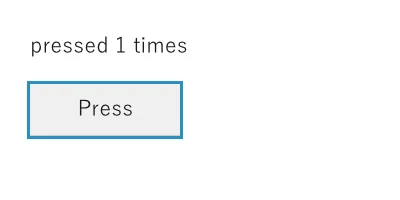
After one press, drawn without opening a window
view draws nothing. It answers a description of what to draw (a Paint), and the runtime draws what differs from the frame before. Pressing the button sends a message of class Bump, and Counter >> Bump answers the next state. A colour is written as a name, #paper, and theme says what each name is.
Screens are covered in Screens, actors in Actors.
Checking Without a Window
A screen can draw one frame to a PNG without opening a window. Clicks, keys, typed text, even an input method halfway through a conversion, are given as arguments. Every picture on this site was drawn by LP-9 this way.
lp9 run counter.lp9 --click 70,105 --shot out.png
lp9 run entry.lp9 --click 120,40 --text 受注伝票 --key Return --shot out.png
The conformance run has 29 screens checked this way: given input, and what they drew compared.
Modules
One file is one module, and a file declares no name. The program's own file is Main; an imported file is named by its path: ui.lp9 is Ui, date_picker.lp9 is DatePicker, net/http_client.lp9 is Net::HttpClient.
The header says what the file imports and what it exports. Both are optional.
imports: (Ui, Theme).
exports: (Board, opaque Ticket).
Only the classes exports: lists are visible outside. A class marked opaque is exported as a type with its methods, while making one (fields:) and replacing its fields (copyWith:) stay inside its module.
An import is looked for in the importing file's directory, then in each directory of LP9_PATH, then in the standard library. When none has it, the error lists every path tried.
A class is identified by its module and its name. When two imported modules export a class of the same name, write Sales::Order. A program may declare a Dict of its own without meeting the language's.
The Standard Library
Written in LP-9.
Ui | the widgets (W), a one-line field (Edit), a multi-line box (Memo), a tree view (Tree) |
Theme | colour names and their colours: Theme day and Theme night |
Table | a table's columns, defined once (title, width, right-aligned) |
Comparable | write <, and get >, <=, max: and the rest |
Enumerable | write inject:into:, and get collect:, select:, detect:, sum and the rest |
OrderedDict | a dictionary walked in the order things were put in |